

Browser with boss key and mouse gestures
Turbo Browser includes a built-in boss key and mouse gestures — no need to install extensions like you would in Chrome or Edge. Built on Chromium, free on Windows and macOS, it's ideal if you want to quickly hide the window or navigate pages with right-click drag gestures.
Boss key: hide / show the browser in one keystroke
| Platform | Default shortcut | Action |
|---|---|---|
| Windows | Ctrl + Q | Hide the browser window; press again to restore |
| macOS | Ctrl + Q (Control, not Command) | Same as above |
TIP
On macOS, use Control + Q instead of Command + Q to avoid conflicting with the system "Quit app" shortcut. Customize the boss key under Settings → Mouse gestures; on the same page you can turn on Custom shortcuts and separately toggle Mute while hidden and Restore to foreground (both on by default). Restoring a pinned window keeps it on top.
How to enable or change the boss key
- Open Settings and search for "Boss key".
- Enable the boss key and review the current shortcut.
- Change the key combination if needed.
Mouse gestures: hold right button and drag
Enable under Settings → Mouse gestures. By default, hold the right mouse button and drag to trigger actions:
| Gesture | Default action |
|---|---|
| Up ↑ | Scroll up |
| Down ↓ | Scroll down |
| Left ← | Go back |
| Right → | Go forward |
| Down then right ↓→ | Close current tab |
| Down then left ↓← | Close other tabs |
| Right then left →← | Reopen last closed tab |
| Up then left ↑← | Switch to previous tab |
| Up then right ↑→ | Switch to next tab |
| Right then up →↑ | Open new tab |
| Right then down →↓ | Refresh |
You can customize trail color and width and gesture mappings in Settings, and enable gesture trail visualization.
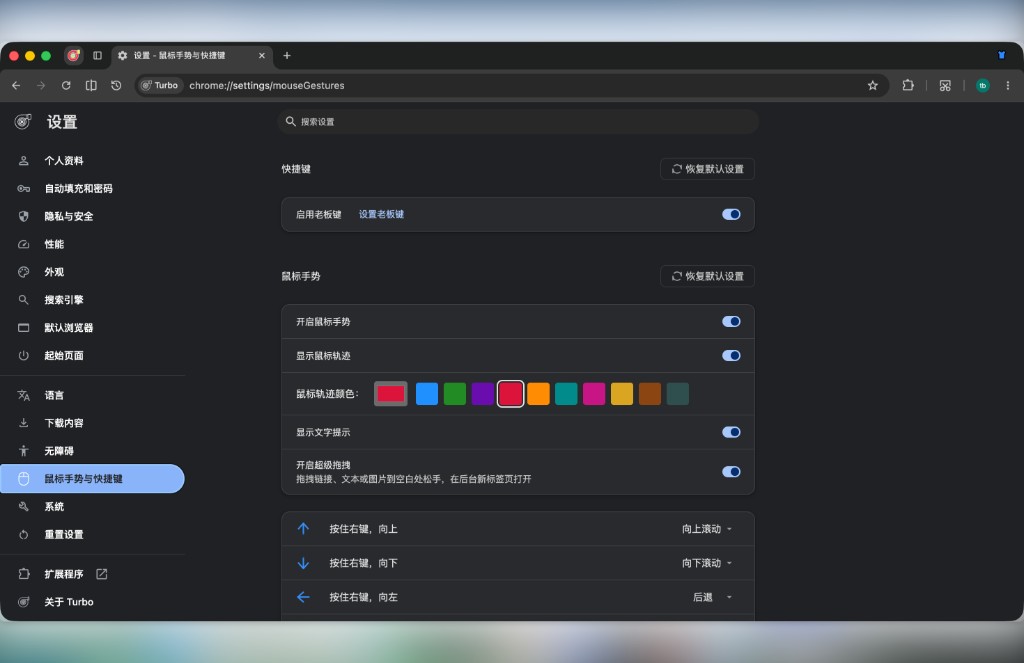
Mouse gestures and boss key: enable and customize in Settings
Super drag
Turbo also supports super drag: drag selected text to a blank area to search or copy; drag links or images to open a new tab or copy. In Settings → Mouse gestures, configure up / down / left / right independently; a follow-cursor tip shows direction and action while dragging (can turn off). Same panel as gestures.
Compared to Chrome / Edge
| Capability | Chrome / Edge | Turbo Browser |
|---|---|---|
| Boss key | Requires extension | Built-in, default Ctrl+Q |
| Mouse gestures | Requires extension | Built-in, customizable |
| Super drag | Requires extension | Built-in |
| Chromium compatibility | ✅ | ✅ |
If gestures or a boss key are why you're switching browsers, pair this with Migrate from Chrome or Migrate from Edge to keep bookmarks and extensions.
FAQ
Boss key doesn't respond?
- Confirm the boss key is enabled in Settings.
- On macOS, make sure you're pressing Control, not Command.
- Check for conflicts with global shortcuts from other apps — change the combination in Settings.
Gestures don't work?
- Confirm Settings → Mouse gestures is enabled.
- Use hold right button and drag (not left click).
- Some pages block the context menu — try gesturing on blank page area first.
What other productivity shortcuts are there?
Turbo also offers region screenshot (Windows Ctrl+Shift+X / macOS Cmd+Shift+X), vertical tabs, restore closed tabs, and more. See Mouse gestures and Shortcuts.